

Halloween Event: Pumpkin War


🔥 Here are the details of the October 22 update
📌 Additional update on October 24: see section 5 below
⚠️ Please update your game client to the latest version before playing

📺 LIVE STREAM
Event and patch details will be announced by E-BAMBAM on stream
Friday, Oct 23, 2026 · 20:00 (GMT+8)
🎃 1. Halloween Event “Pumpkin War” (daily guild war)
- Event period: Oct 24, 2026 01:30 – Nov 1, 2026 00:59 (GMT+8)
- Guild members level 30 and up earn pumpkins for their guild by hunting monsters on PK channels (several players on one monster share by the damage each dealt / no daily limit)
- The Pumpkin King appears from time to time, with no warning of where or when (every map gets a notice once it spawns). Defeat it and its pumpkins are shared by the damage each player dealt
- Whenever the Pumpkin King appears, every map turns into a Halloween night until it is defeated
- Kill a player from another guild on a PK channel to steal 50% of the pumpkins they hold / if you get hit and then log out, warp or change channel, you lose half your pumpkins
- During the event, kills do not add to your PK time, and you can always turn PK off within 60 seconds
- Off a PK channel or offline, your pumpkins slowly rot / leave your guild and all your pumpkins are gone
- Results every day at 01:00 (GMT+8), rewards go to the Item Mall Warehouse daily: guilds ranked 1 - 3 get the Skyblue Weapon Support Box + Mysterious Ancient Stone Box II + Mysterious Evo Gem Box II, up to 1,500 of each / players ranked 1 - 3 and players who collect 1,000+ pumpkins also get rewards (full reward list in the guide)
The staff may adjust the event rewards from day to day - Defeating the Pumpkin King: every 5% of the damage you deal = 1 lucky draw for Slime Cards / Halloween Night / Scarlet Stone Fragment x10 - x20 / Scarlet Stone High x3 - x5
- Player rewards and lucky draw items are bound and cannot be traded
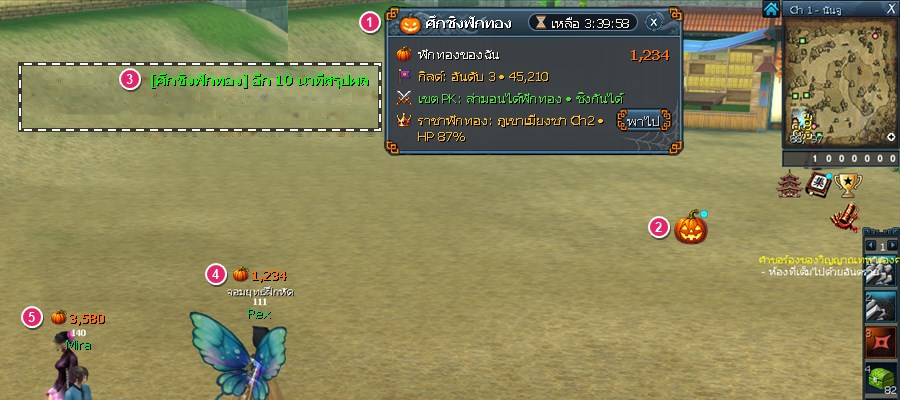
- 1 Tracker next to the minimap: my pumpkins / guild rank / status where you stand / the Pumpkin King now (all windows in a Halloween theme)
- 2 Pumpkin button next to the event button (under the minimap): guild ranking / players / Pumpkin King (with a Go button) / rewards / rules
- 3 Mid-screen notice in green text
- 4 5 Pumpkin counts appear above the head of everyone taking part (yours and other players' on the same channel)
📖 Full rules, times and rewards
Animated guide, 33 steps • Thai / English / 中文 • tap a reward item to see what's in the box
✨ 2. New Systems
2.1 Titles can be fused up to 25 tiers (fusion not open yet)
- Fuse titles up to 25 tiers (I-1 to V-5) with effects: the higher the tier, the flashier
2.2 Market: “Buy orders” (4th tab)
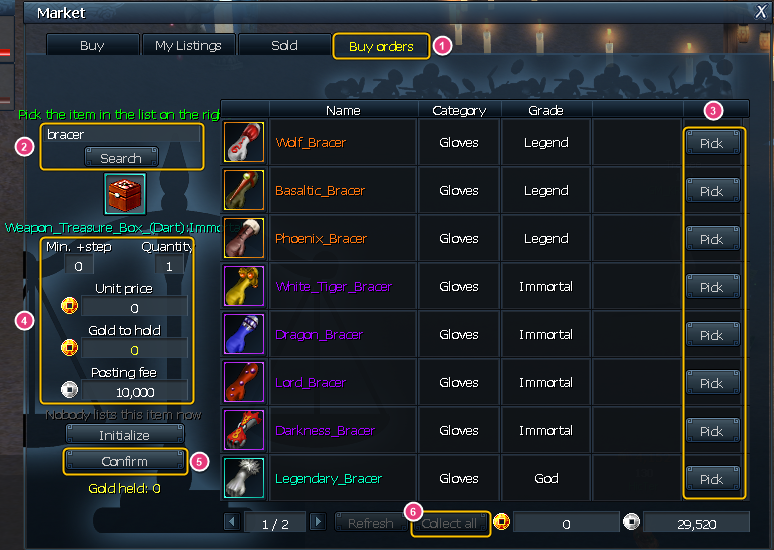
1 Buy orders tab → 2 search for the item → 3 click Pick on the item you want → 4 set min. + / quantity / unit price (posting fee 10,000 Silver Coins) → 5 click Confirm → 6 once someone sells to you, click Collect all to get the items
- Set a buying price for items you want so others can sell to you even when you're not online at the same time
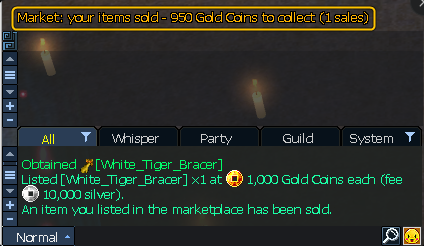
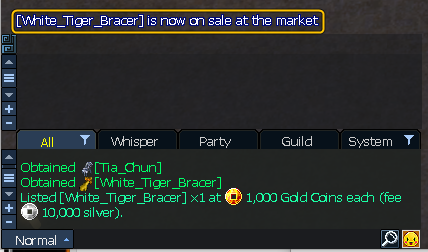
- Alerts above the chat when something sells / when bought items are waiting for you
- A notice appears when a Mythical-grade or higher item is listed; click the item name in the notice to see its details
2.3 Collector ranking
- Complete 1 collection set = 1 point
- See the ranking in the Ranking window (“Collection” button) or with the “Ranking” button in the Collection Book
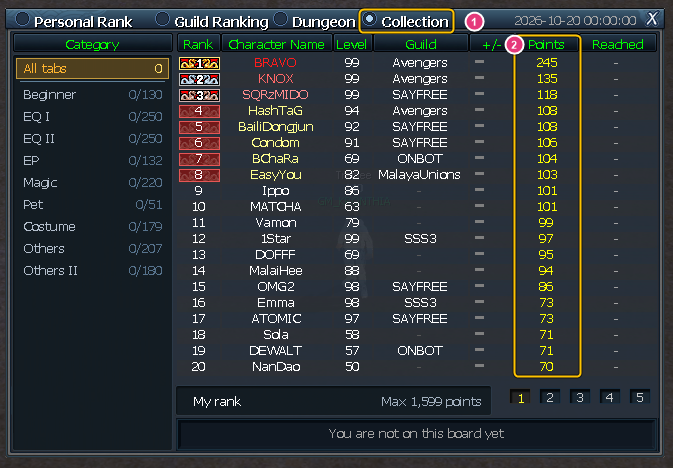
1 Collection tab · 2 Points = number of completed sets
2.4 Castle War
- Registration is closed: guilds that qualify (guild level 2+, 5+ members) are signed up for the Attack Side automatically, no need to register
- Guilds that applied for the Defense Side but were not accepted join the Attack Side instead
- Every map gets a notice for First Blood and for kill streaks of 10 / 20 / 30 / 40 / 50
- When the war ends, the top 20 killers (players / monsters) are shown in chat
- Adjust the time / score window yourself (gear button on the window title): 3 sizes (full / compact / one-line bar) / background opacity 0 - 90% / click through it to attack gates or players behind it / drag it anywhere; the game remembers it per character
2.5 Guild / Guild Tournament
- Right-click a member's name in the guild window: Whisper / Add friend / Write message / Copy name
(guild master: set title / appoint / expel from this menu)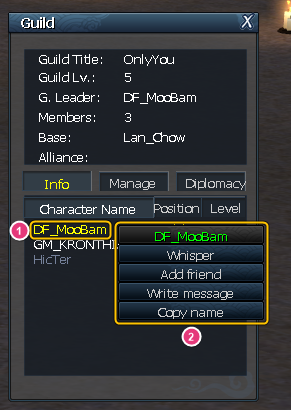
1 right-click a member's name → 2 Whisper / Add friend / Write message / Copy name menu - The Guild Tournament board shows how many members of each guild are in the room, and the “Watch” window has an “In room” column
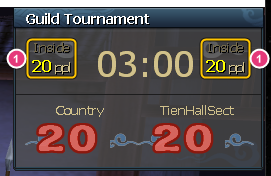
1 members of each guild in the room (Inside … ppl)
2.6 Graphics settings (press O > Graphics tab)
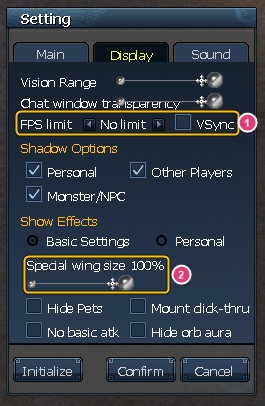
- 1 FPS limit (30 / 60 / 90 / 120 / 144 / 165 / 240 / unlimited) and VSync keep your PC cooler and your graphics card less busy
- 2 Special wing size 30 - 100%, only on your own screen
2.7 Hotkeys / tooltips
- Hold Ctrl = point / click / right-click through bosses, monsters, NPCs, pets and mounts to the nearest player
- Hold Alt for 2 seconds while pointing at an item that can be fused / dismantled to browse its materials several levels deep without opening the fusion / dismantle window (release Alt to close)

1 hold Alt for 2 seconds to pin the tooltip → 2 point at an icon in the side panel → 3 that item's tooltip opens next; keep going several levels
2.8 Quests / mounts
- Double-click a target in the quest tracker = auto travel; if you have a mount faster than your character, it is summoned and ridden there for you, then put away when you arrive
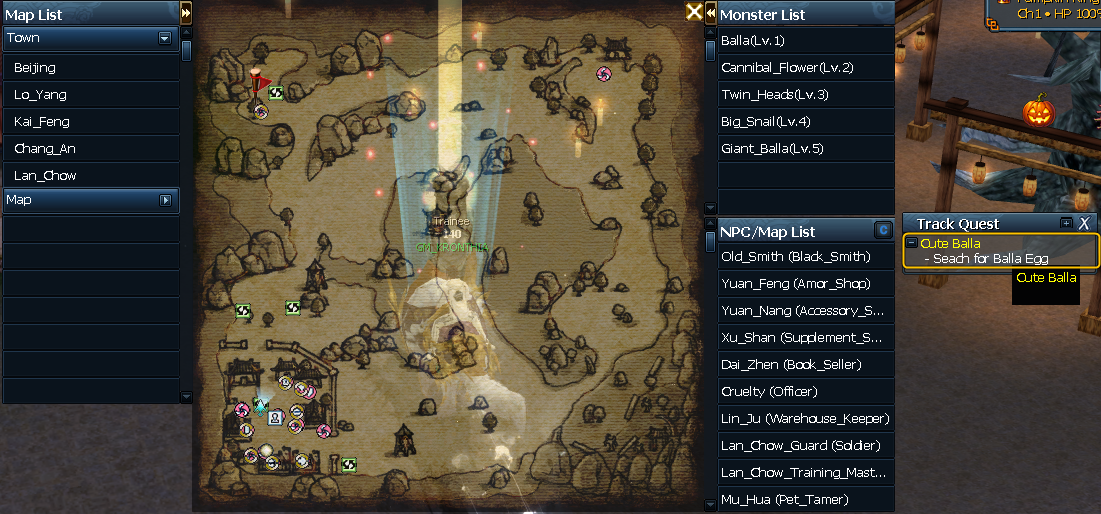
- The mount icon in use has a red frame and the word “In use”
2.9 Items / Item Mall shop
- Item Mall shop: new rideable mounts in the Mount tab, buyable with Online Point
- Item Mall shop: for items marked “can buy past days”, if you missed a day you can still buy that day's purchase later (new accounts can too)
Click the check button on the product slot to see how many more times you can buy now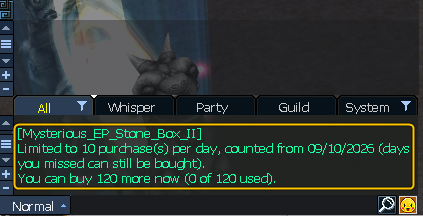
- Item Mall shop: the “Purchase history” button on the shop title bar shows purchases from every character on the account (purchases from Oct 22, 2026 20:00 GMT+8 onward)
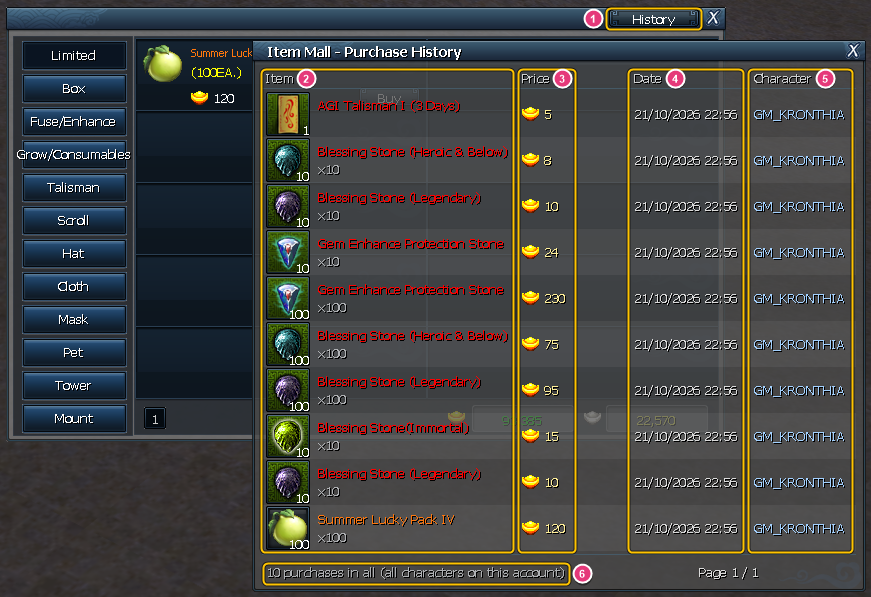
1 History button · 2 item / quantity · 3 price / paid with · 4 date and time · 5 character · 6 all characters on the account - Item Mall shop: the order confirmation now lets you choose to buy 1 - 100 times in one click (limited items: up to your remaining allowance)
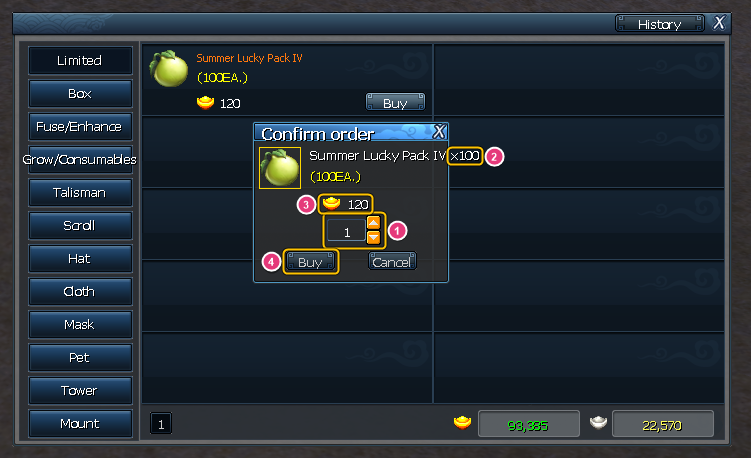
1 choose how many times (type a number or use the arrows) → 2 quantity and 3 price change with it → 4 click Buy to buy them all at once - Potion Storage: new checkbox “Discard drops of a full potion” (potions dropped by monsters won't go to your bag once that potion type is full at 5,000)
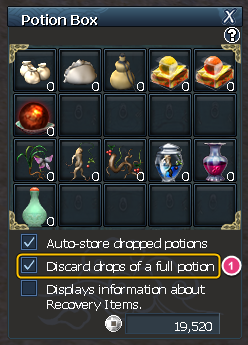
1 tick Discard drops of a full potion - Dismantle window: right-click an item you've placed to take it out
2.10 Server boss notice

- New server boss notice: big boss name, no longer overlaps other notices
- 1 boss name · 2 map + channel where it appeared
2.11 Switch the game language in-game (Thai / English / 中文)
- Press O > General tab > “Language” row, use the arrows to choose Thai / English / 中文, then click OK
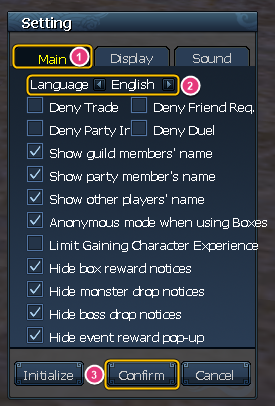
1 Main (General) tab → 2 Language row, pick a language with the arrows → 3 click Confirm - In a town or a regular map, the game asks once whether to warp: warp = you're back on the same spot in the new language right away / don't warp = it changes the next time you change maps
- In a dungeon, tower or boss room, or with the bot on, the language changes when you warp or change maps / the game also opens in your chosen language next time
⚖️ 3. Changes
3.1 Castle War (rules now match the original)
- If you don't revive within 10 seconds of dying, you revive automatically at your side's spawn point
- No death penalty in the war: no Weaken / Musang is kept / pet intimacy doesn't drop
- Once you start engraving you can't cancel it yourself / players who are engraving take full damage
- Outside war time, only allies of the guild holding the castle can enter the castle map / guilds that join the castle alliance become defenders right away
- The master of the guild holding the castle can withdraw castle tax as Gold Coins (1,000 = 1 Gold Coin)
3.2 Fortress War (rules now match the original)
- Every map gets a notice 30 / 10 / 5 / 1 minutes before the battle starts
- You can engrave from farther away / once you start engraving you can't cancel it yourself
- During the battle, reviving on the spot / at the spawn point or entering the battlefield map puts you at a random point on the field (reviving in town = back to town) / there are no safe zones on the field
- During the battle, killing players on the battlefield's PK channel gives no looted money and no PVP points
- Ancient Stone Fragments / Ancient Stones dropped inside the fortress area have a 1% chance to go into the Fortress Vault; the master of the guild holding the fortress can withdraw them on that fortress's battlefield outside battle time
- The guild holding the fortress gets 7,000 guild points every time a battle ends
3.3 Bloodbath Field (new rules)
- Outside villages you can attack anyone without turning PK on, on every channel (except party / guild / alliance members and safe zones)
- If neither the killer nor the victim had PK on = no EXP loss when reviving on the spot / at the spawn point
- PK channels give bonus EXP / Skill Points from hunting monsters (no need to turn PK on)
- PVP points depend on the score and level difference, so killing high scorers gives more / every day at 01:10 (GMT+8) scores move 50 toward 0
3.4 PK channels / bosses
- PK channels expanded from 1 to 4 channels
- Some field bosses and world bosses now respawn faster
- Bosses Frost Minotaur and Blaze Minotaur: HP and AP ×3 / boss The Great Minotaur: HP and AP ×10
3.5 Bot
- Improved auto talisman use and bot Presets 1 - 4
- Bot in dungeons: when the dungeon ends and the bot is still on, your character walks back to the same dungeon's entrance; enter again and the bot carries on right away
- With the bot on you can't use Village Move / Location Move scrolls; turn the bot off first
- If you run the bot on more screens than one PC allows, the warning lists the characters currently running it
3.6 Skills / stats
- Skill EXP Exchange Scroll: EXP moves as a % of the bar, the original skill keeps its own level, hotkeys / window positions are no longer lost
- Healing / Inner Power recovery skills: the calculation now matches the original; the amount grows with that skill's elemental attack % from equipment, abilities and set items (the skill tooltip shows the real amount you get)
- Weapon skills that follow a basic skill: power at basic skill level 12 now matches the original
- Enhancement stats (+1 to +30) of level 75 / 90 / 95 accessories now match the original: Spirit / Courage / Tears / Determination of Minotaur, Red Dragon Cloak / Belt / Necklace / Ring, Fury / Sorrow / Madness of Bugasal
(cloaks and necklaces get Fire / Water / Metal resistance, belts get max HP, necklaces get max AP / items already enhanced get the new values right away)
3.7 Market / shops
- NPC shop buy / sell prices shown now match what you actually pay / receive (castle / fortress tax included)
3.8 Wanted Scroll
- Always tells you why the target wasn't found (e.g. misspelled name / offline)
- If the target is on a map with no minimap, the map name + channel are shown in chat instead
3.9 Change password on the character select screen
- Accounts without an email can add their own email (so “Forgot password” works from now on)
- New passwords use a-z A-Z 0-9, 4 - 16 characters
3.10 Game file protection
- Improved protection of the game's data files: every data file uses new encryption (nothing for players to do)
🛠️ 4. Bug Fixes
4.1 Pets / fashion / wings
- Pets couldn't be summoned in the Guild Tournament arena / Castle War even with a free slot
- The fashion window was empty in the Guild Tournament arena / boss rooms
- Wings ended up on another character after changing hairstyle
- Pet info: the “Critical Rate +” stat was shown as a %, now displayed correctly
4.2 Dungeons / Tower of Honor / chat / voice
- Dungeon “Watch” window: with more than 10 parties in dungeons at once, later parties were missing from the list (now you can scroll through every party with the mouse wheel, and the title shows how many parties are inside)
- Tower of Honor: players on the same floor far apart sometimes couldn't see each other
- Chat history disappeared after entering a dungeon / clicking Watch
- Chat translation: messages in another language containing an item link said “This message is already in Thai” and weren't translated
- In-game voice (party voice chat) couldn't connect
4.3 Windows / display
- Garbled text when pointing at a boss icon on the map
- Guild window: expel / appoint after re-sorting the list hit the wrong member
- Skills that raise dodge showed a duration of “0.0 seconds”, now displayed correctly
- Character window (C): Item Mall items with both “Weapon Skill Crit” and “Element Skill Crit” are now displayed correctly
- English / Chinese clients: some mount, boss, pet and NPC names showed as garbled Chinese or Thai
- Long item names in item links on Speakers and in chat overflowed the frame
- Heals over 65,535 at once showed the wrong number and the HP bar didn't match what you actually received
4.4 Items
- Several of the same item from one field boss kill (e.g. Scarlet Stone Fragment) went into separate bag slots and were lost when only one free slot was left (now they stack into one)
 Scarlet Stone Fragment
4.5 Fortress War
- Engraving from too far away froze the character: couldn't move / use skills / log out
- When the battle on another map ended, the battle window on maps still fighting disappeared
- After a fortress changed hands, other maps still showed the previous owner (couldn't withdraw from the Fortress Vault) until maintenance
4.6 Bot
- The “Counterattack to PK User” option now works: when a player hits you, you turn and fight them right away (skills used to go to monsters instead); works in PK, guild war, Fortress War and the Bloodbath Field
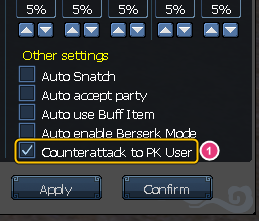
1 tick Counterattack to PK User in the bot window
🆕 5. Additional Update: October 24
5.1 Halloween Event “Pumpkin War”
- If you die on a PK channel and stay down for more than 30 seconds (without reviving), your pumpkins slowly rot as if you were off a PK channel until you revive (with a warning message + a countdown in the tracker)
5.2 New Systems
- Costume weapons can now go in hotkey slots: drag a costume weapon from your Item Mall Inventory or the fashion window into a hotkey slot, then press that key to put it on / press it again to take it off
(the one you are wearing has a red frame in its hotkey slot / sealed costumes must be unsealed first) - Tower of Infinity: Auto Play has a new “Use Retry Scroll” checkbox — when ticked, replaying a floor you have already challenged uses a Retry Scroll instead of a challenge attempt (when you run out of scrolls, it goes on using your attempts automatically)
5.3 Changes
- Tower of Infinity: monsters now drop items and money at every level, no matter how much higher your character's level is than the monster's (other maps unchanged)
- Tower of Honor: when a floor has no players left, or every player still on the floor already has all the keys above their head, the round on that floor ends immediately (no more waiting for the 2-minute countdown or for time to run out)
Players who are dead when the floor's round ends revive on their own within 5 seconds - Guild arena (Guild Tournament): mounts cannot be used anywhere on the map — you cannot summon a mount, and if you are riding one when you enter the arena, you come in on foot (you can summon mounts as usual after leaving the arena)
5.4 Bug Fixes
- Hotkey slots: after equipping gear, a red frame appeared in the wrong place, covering the next slot (the red frame now shows only on gear you are wearing, exactly on its slot / rare item and enhancement marks look the same as in your inventory)
- Fusion window: recipes that use Item Mall items as materials (e.g. Black Pumpkin / Rainbow Pumpkin for the Halloween Pumpkin Head Pack recipe, and Slime Cards) showed 0 materials and could not be fused even though the items were in your Item Mall Inventory (they are counted now)
- Guild Tournament: if you entered the arena from the notification popup while in a dungeon / tower / boss room etc., you were sent back into that map after the match (you now return to the town where your spawn point is set; if your spawn point is not in a town, you go to Lan Chow)
- PK mode: sometimes the countdown had run out but PK could not be turned off and no message appeared (the time added for killing a player now always matches the server / if you try to turn PK off early, it tells you the actual time left)
Have more questions? Ask our team on Discord.