

Castle War Kill Counts Above Heads, Post-Battle Summary, Plus Bot Updates and Bug Fixes

🔥 Here are the details of the October 29 update
⚠️ Please update your game client to the latest version before playing
🎁 1. New Items
- Halloween Lucky Box V: now on sale in the Item Mall under the Limited tab / a lucky box with 26 possible items to win
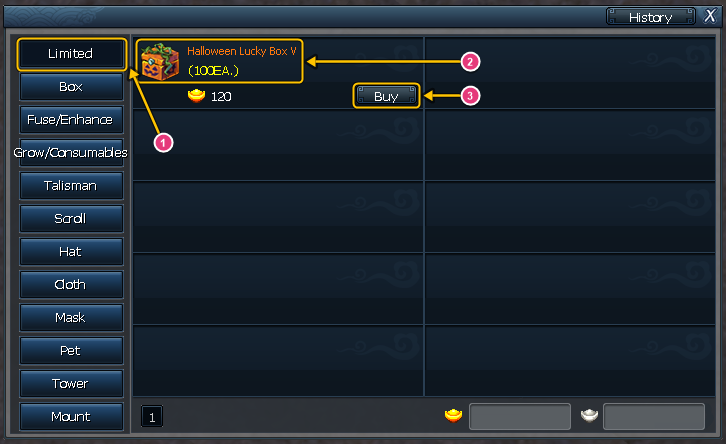
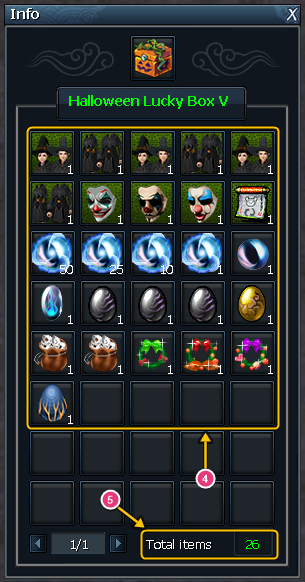
1 Limited tab · 2 Halloween Lucky Box V · 3 Buy button · 4 Items you can get from the box · 5 Total number of items (26)
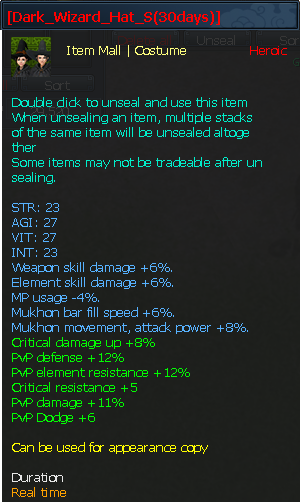
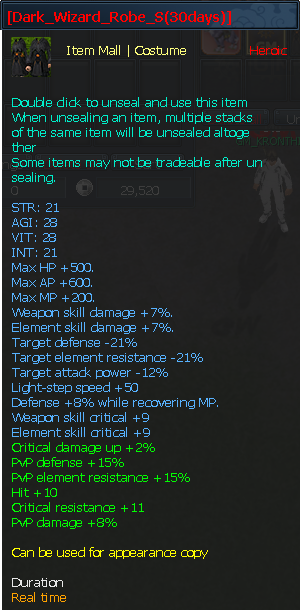
Dark Wizard set in the box (Hat / Robe, all 3 tiers):
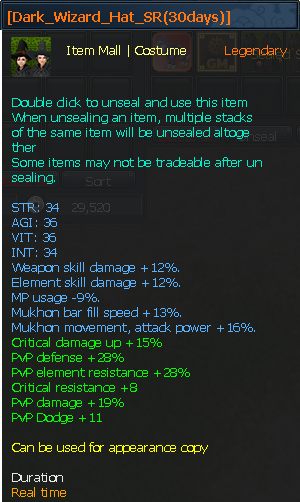
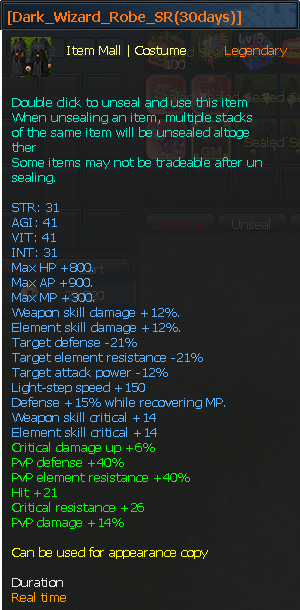
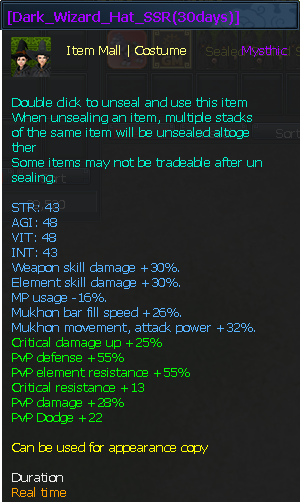
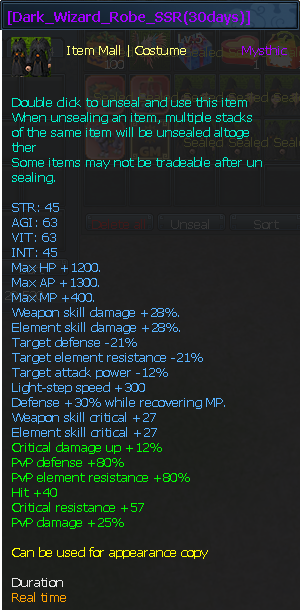
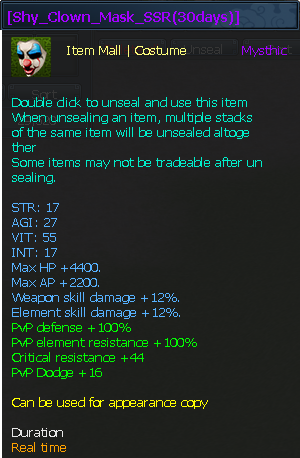
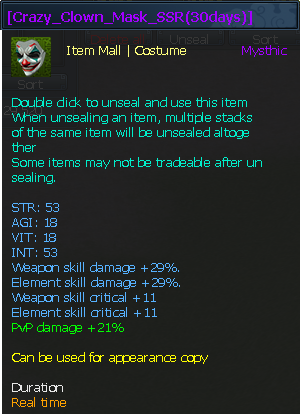
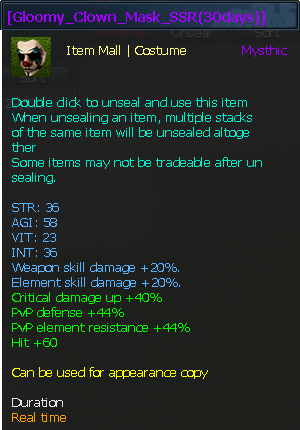
Clown Masks in the box (SSR):
✨ 2. New Systems
2.1 Castle War
- Kill counts above heads: during the war, each participant's kill count shows above their head, just like in the Guild Tournament (yellow = your side / red = enemy side)
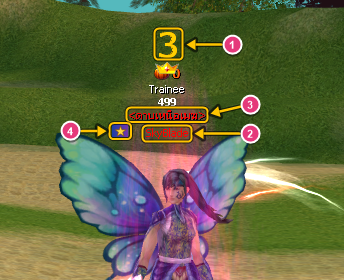
1 Kill count · 2 Character name · 3 Title · 4 Guild emblem - Summary table: when the war ends, a Kills / Deaths table for the Defense Side and Attack Side is shown (top 10 of each side plus side totals), and your own result is posted in chat
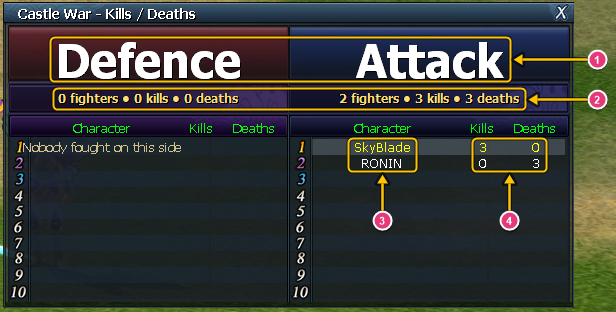
1 Defense Side / Attack Side · 2 Side totals (players / kills / deaths) · 3 Top 10 of each side · 4 Kills / deaths - Score mode: in the last 10 minutes of the war, points from every action are x2 (holding the castle / engraving / kills / guild masters / public monsters / destroying gates), with a mid-screen notice when it starts and an x2 badge on the scoreboard

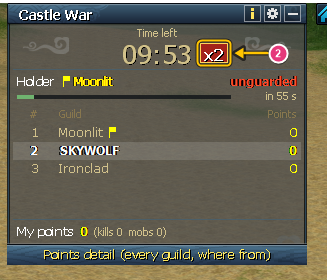
1 Mid-screen notice when the last 10 minutes start · 2 x2 badge on the scoreboard
2.2 Bot
- The “Other settings” box can now be scrolled (arrow buttons / drag the bar / mouse wheel)
- New option “Disable auto-reconnect”: when ticked, if you get disconnected for any reason the game will not reconnect by itself (press OK to return to the server select screen) / unticked = auto-reconnect as before
⚖️ 3. Changes
3.1 Reborn Characters
- All skills you have learned can be used from level 1, e.g. Qinggong, item Fusion, Power-Up and item Dismantle, without having to level back up first (training the next tier still requires the usual level)
3.2 Collection
- Equipment slots only accept items at exactly the required enhancement level (e.g. a slot asking for a +9 Earring only takes a +9 Earring / a +0 slot only takes +0)
- The auto-register button only picks matching items, so you can't register a higher-enhanced item by accident
3.3 Guild Tournament
- After each match, a “Tournament result” window shows the winning / losing guild and the top 10 killers of each side
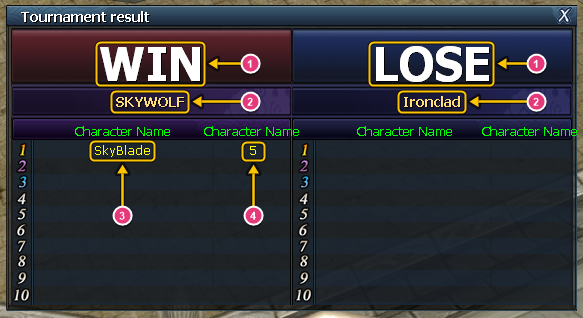
1 Win / lose · 2 Guild name · 3 Character name · 4 Kills
3.4 Halloween Event “Pumpkin War”
- When the Pumpkin King appears, every map still turns to night as before, except special maps (dungeons, Tower of Infinity, Tower of Honor, Guild Tournament, Castle War, boss rooms) and maps with a Fortress War in progress, which stay bright so you can see clearly while fighting (the boss music still plays on every map as before)
3.5 Tower of Infinity / Tower of Honor
- Leaving the Tower of Infinity (in every case, including auto-play climbing several floors in a row) or the Tower of Honor now returns you to the town / field you were in before entering (previously the Tower of Infinity always sent you back to Lan Chow / the Tower of Honor sent some players to their spawn point)
3.6 Quest Window
- “Log” tab: every entry now shows the time (hour:minute) after the date, e.g. 2026.10.28 14:35
3.7 Field Boss
- [Black Star] Cerberus (map: Cursed Mountain Sung): HP reduced by 50% from before
3.8 Items
- Purify Holy Water (lowers Infamy) can now be dragged into a hotkey slot; press the hotkey to use it right away, just like double-clicking (must be unsealed first)
3.9 Guild
- Clearer messages when appointing a guild master or changing ranks (e.g. the new guild master must be online and on the same map / this position may already be full / the selected player is not a guild member), and the guild master's name in the guild window updates right after the appointment
- Improved server-side security checks for guild commands
🛠️ 4. Bug Fixes
4.1 Bosses / Halloween Event
- Boss icons on the minimap and world map: the Pumpkin King / field bosses were not shown if you entered the map or switched channel after the boss spawned, and the icon vanished when the boss on another channel died (now the boss of your current channel is shown correctly)
- The “Go” button for the Pumpkin King in the pumpkin event tracker now takes you to the channel the King is on (it used to always take you to channel 1, even when the King spawned on another channel)
- Server boss treasure chests: clicking some chests did nothing, or the chest vanished when clicked (they now open normally, and a message tells you if another player is already opening that chest)
4.2 Windows / display
- Other player info window: movement speed showed lower than what that player sees in their own character window (they now match)
- Quest window, “Log” tab: entries added while the window was open (quest completed / Arrest Warrant result / level up) sometimes showed the wrong date (now shown correctly)
- Pet Cradle: the Intimacy % in the cradle window and in the Pet Cradle skill description was wrong when using a Pet Intimacy Scroll (the Intimacy pets in the cradle actually received was already correct; the displayed number now matches what is received), and text in the cradle window no longer breaks mid-word
- “Wu Shang Jian Jue” buff icon: hovering the mouse over it closed the game (the buff details now show normally, and the same spot in the skill window and skill book is protected too)
- Hotkey slots: stackable Item Mall items (e.g. scrolls) sometimes didn't appear when dragged into a hotkey slot if your bag held another stack of the same item that was still sealed (they can now be dragged in normally)
4.3 Movement
- Wars / crowded areas: other players using Qinggong sometimes appeared to fly abnormally slowly and then teleport when they changed direction mid-flight (they now fly at their real speed without teleporting)
- Walking along walls or unwalkable edges sometimes pulled the character back to where it was, or made it jump several tiles on its own (you can now walk along walls smoothly)
4.4 Guild
- Guild window: level numbers in the member list overlapped the scroll bar and were cut off (they now sit under the “Level” header and are fully readable)
- After the guild master position was transferred, some maps still treated the old master as guild master until the server restarted (all maps now switch to the new master immediately)
- After the guild master position was transferred, a server restart reverted the guild master's name in the guild window and guild ranking to the old master (it is now saved permanently, and guilds transferred earlier have been fixed)
- Members whose rank was changed while on a different map from the guild master had to change maps before they could use their new rank's permissions (they now apply immediately)
- English / Chinese clients: in the rank appointment window, choosing Vice Master or Member and pressing OK did nothing (it now works in every language)
Have more questions? Ask our team on Discord.